6/11/2008 9:21:45 AM v0.914031/UNI
6/11/2008 9:21:45 AM CARD SERIAL: 00032462
6/11/2008 9:21:45 AM Loaded 51 flash descriptors
6/11/2008 9:22:30 AM SIGNED MODE (USING SERVER).
6/11/2008 9:22:30 AM ALTERNATIVE SECURITY BYPASS ENABLED.
6/11/2008 9:24:51 AM ChipID:9900,EMP protocol:0301
6/11/2008 9:24:51 AM
6/11/2008 9:24:51 AM PHONE IS RED RETAIL PRODUCT
6/11/2008 9:24:52 AM FLASH CID detected:53
6/11/2008 9:24:52 AM Speed:115200
6/11/2008 9:24:52 AM Flash ID check:897E
6/11/2008 9:24:52 AM Flash props sent ok
6/11/2008 9:24:52 AM OTP LOCKED:1 CID:51 PAF:1 IMEI:35934601056997 CERT:RED
6/11/2008 9:24:52 AM FLASH CID:53 COLOR:RED
6/11/2008 9:24:54 AM
6/11/2008 9:24:54 AM Model:K550i
6/11/2008 9:24:54 AM MAPP CXC article: R6BC002 prgCXC1250669_GENERIC_LI
6/11/2008 9:24:54 AM MAPP CXC version: R6BC002
6/11/2008 9:24:54 AM Language Package:VIVO
6/11/2008 9:24:54 AM CDA article: CDA102743/132
6/11/2008 9:24:54 AM CDA version: R10A
6/11/2008 9:24:54 AM Default article: cxc1250671
6/11/2008 9:24:54 AM Default version: R6BC002
6/11/2008 9:24:54 AM PROVIDER: 000-00
6/11/2008 9:24:54 AM Network LOCKED
6/11/2008 9:24:54 AM
6/11/2008 9:24:54 AM RESTORATION FILE PRESENT FOR DETECTED FIRMWARE
6/11/2008 9:24:54 AM
6/11/2008 9:24:54 AM BYPASS PACKAGE PRESENT FOR DETECTED FIRMWARE
6/11/2008 9:24:54 AM
6/11/2008 9:24:54 AM SECURITY UNITS BACKUP CREATED.
6/11/2008 9:24:54 AM Elapsed: 144 secs.
6/11/2008 10:25:18 AM SIGNED MODE (USING SERVER).
6/11/2008 10:25:18 AM ALTERNATIVE SECURITY BYPASS ENABLED.
6/11/2008 10:25:28 AM ChipID:9900,EMP protocol:0301
6/11/2008 10:25:28 AM
6/11/2008 10:25:28 AM PHONE IS RED RETAIL PRODUCT
6/11/2008 10:25:28 AM FLASH CID detected:53
6/11/2008 10:25:28 AM Speed:115200
6/11/2008 10:25:29 AM OTP LOCKED:1 CID:51 PAF:1 IMEI:35934601056997 CERT:RED
6/11/2008 10:25:29 AM FLASH CID:53 COLOR:RED
6/11/2008 10:25:30 AM PATCH:


 071120 1355
 HANCXC9876543210_DB2020_MEM_PATCHER_R2A012 0
6/11/2008 10:25:30 AM LDR:080108 1810 ESGCXC1329129_DB2020_FLASHLOADER_R2A015
6/11/2008 10:25:30 AM Flash ID check:897E
6/11/2008 10:25:30 AM Flash props sent ok
6/11/2008 10:25:32 AM LDR:070904 1245 AN2CXC1250562_DB2020_CSLOADER_R3A013
6/11/2008 10:25:32 AM loader startup: executed
6/11/2008 10:25:50 AM loader GDFS startup: executed
6/11/2008 10:26:03 AM loader filesystem startup: executed
6/11/2008 10:26:03 AM loader unlock: executed
6/11/2008 10:26:09 AM
6/11/2008 10:26:09 AM DISCONNECT PHONE NOW
6/11/2008 10:26:09 AM INSERT SIM CARD, FULLY TURN PHONE ON AND ATTACH AGAIN
6/11/2008 10:26:09 AM BE SURE THAT YOU SET PHONE IN "PHONE MODE"
6/11/2008 10:26:09 AM IF ASKED, INSTALL PHONE DRIVERS
6/11/2008 10:26:09 AM
6/11/2008 10:26:09 AM SEARCHING FOR PHONE, "STOP" TO ABORT
6/11/2008 10:28:26 AM PHONE FOUND AT COM97
6/11/2008 10:28:34 AM PHONE READY TO PROCEED
6/11/2008 10:28:40 AM EXECUTOR STARTED
6/11/2008 10:28:40 AM
6/11/2008 10:28:40 AM REMOVE CABLE FROM PHONE
6/11/2008 10:28:40 AM REMOVE BATTERY FROM PHONE, THEN INSERT IT BACK
6/11/2008 10:28:40 AM THEN PRESS "READY"
6/11/2008 10:29:06 AM
6/11/2008 10:29:07 AM bypassing security...
6/11/2008 10:29:09 AM ChipID:9900,EMP protocol:0301
6/11/2008 10:29:09 AM
6/11/2008 10:29:09 AM PHONE IS RED RETAIL PRODUCT
6/11/2008 10:29:09 AM FLASH CID detected:53
6/11/2008 10:29:10 AM Speed:115200
6/11/2008 10:29:10 AM Trying to launch embedded bootloader...
6/11/2008 10:29:10 AM INT LDR
6/11/2008 10:29:11 AM Flash ID check:897E
6/11/2008 10:29:11 AM Flash props sent ok
6/11/2008 10:29:20 AM FOUND: R6BC002_CXC1250669_GENERIC_LI
6/11/2008 10:29:20 AM Restore from:R6BC002_CXC1250669_GENERIC_LI
6/11/2008 10:29:31 AM writing D:\zz-things\setool3\SE-Flashs\K550\R6BC002_1250669_GENERIC_LI_CID53.ssw
6/11/2008 10:29:38 AM CURRENT FLASH FILE CID:53
6/11/2008 10:29:38 AM SSW uses complete hash, hash len is:9200
6/11/2008 10:29:39 AM Will flash 460 blocks...
6/11/2008 10
6/11/2008 10
6/11/2008 10
6/11/2008 10
6/11/2008 10
6/11/2008 10
6/11/2008 10
6/11/2008 10
6/11/2008 10
6/11/2008 10
6/11/2008 10060426 1726 HANCXC1329133_DB2020_FILESYSTEMLOADER_P5G
6/11/2008 10
6/11/2008 10
6/11/2008 10
6/11/2008 10
6/11/2008 10
6/11/2008 10
6/11/2008 10
6/11/2008 10
6/11/2008 10
6/11/2008 10
6/11/2008 10
6/11/2008 10
6/11/2008 10
6/11/2008 10
6/11/2008 10
6/11/2008 10
6/11/2008 10
6/11/2008 10
6/11/2008 10
6/11/2008 10
6/11/2008 10
6/11/2008 10
6/11/2008 10
6/11/2008 10
6/11/2008 10
6/11/2008 10
6/11/2008 10


Back-up your GDFS file and write your GDFS
Click “Read GDFS”, and then hold down the C button on your phone, and then plug in the cable. It will go to a point , where it says “PROGRAMMING FLASH”. Once it says, Unplug the cable , then Unplug your phone, take the battery out, put the battery back in, hold down C, press the “READY” button, then plug the phone back in, but after you plug it in, about 2 seconds after, release the C button. SETool 2 Lite will now read the GDFS and then it will say “Getting GDFS Chunk” , and then it has fully read your GDFS, you can click “Quit”.Take the battery out for about 20 seconds, and then put it back in.
"Write gdfs" will write gdfs to phone in BINARY format. File selected in "MISC. Box" will be assumed as gdfs in binary format.
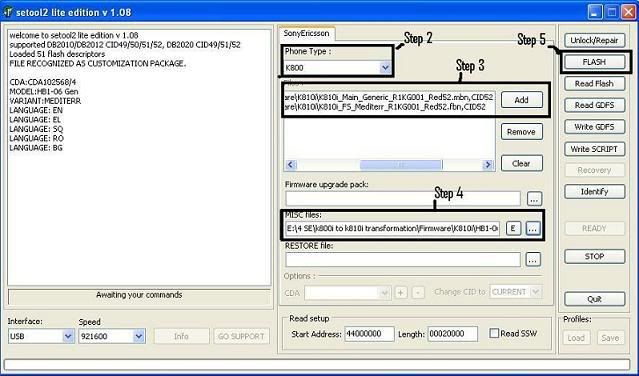
2. Flash your phone using setool2lite
Step 1: Turn off your phone and open setool2lite.
Step 2: Choose your phone model.
Step 3: Press the ADD button and select the Main&FS files (.mbn & .fbn). MAIN and FS can also be bin files. In fact the only important thing is that, they're unencrypted.
Step 4: Select the archive with the customization files (.zip).After it is recognized by the program , in the left side will appear informations about the customization.The archive(.zip) contain files from tpa/preset/custom.
Step 5: Press the FLASH button.
Step 6: Connect the usb cable while holding down the "c" button un your phone. Then wait for the process to finish.
Step 7: Disconnect your phone , get the battery out for 5 seconds , insert battery again and start up the phone।It will appear a screen with "Please Wait...", wait 1-2 minutes and then the phone will start normally.
sofware download is here
setool2lite v 1.11
http://www.fportal.uni.cc/e107_files...2LiteV1.11.rar
Flash Driver for DCU-60 Cable
http://www.4shared.com/file/27136649.../gg-setup.html
I hope this is the last of it
If credits you have are for srv01 (aka. ip.196 or 195.91.135.196), insert the following 2 lines into your setool.ini file overwriting the old 2 lines
Need to set-up setool.int Where your credits are srvo1= ip.196,srvo2= ip.197,srvo3= ip.198,
srvo1= ip.196
Code:main]servers=srv01.dontexist.com,srv02.dontexist.com,sr v03.dontexist.comserver=srv01.dontexist.com
srvo2= ip.197
Code:servers=srv01.dontexist.com,srv02.dontexist.com,sr v03.dontexist.comserver=srv02.dontexist.com
srvo2= ip.198
Code:servers=srv01.dontexist.com,srv02.dontexist.com,srv03.dont exist.comserver=srv03.dontexist.com
If you receive the message BAD USERNAME/PASSWORD this means you selected wrong server
If you receive the message SERVER CLOSED FOR PUBLIC (after making above modification to setool.ini) this means server is closed.
Credits cannot be transferred from one server to another.
Credits do not expire.
Funlight Editor was designed to help you customize the way your Motorola phone flickers when you receive incoming calls, messages and etc.
You can easily specify the colors to display, change tempo an alter other parameters of flickering by editing "funlight.pat" file (located in "/a/mobile/audio").
Bult-in preview feature allows you to view your changes without wasting time to upload funlights to your phone.
Download the latest version: 2.2.7
Interface screenshots
Available languages
English
Espanol
German
Hebrew
Italiano
Polish
Portuguese
Russian
Spanish

Back Up GDFS/Restore GDFS
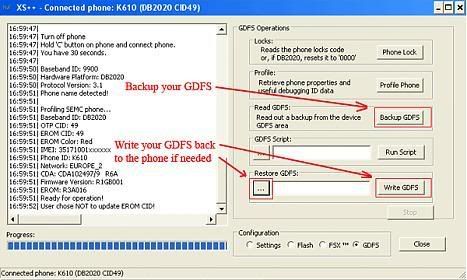
The GDFS contains the calibration data of your phone. Your phone won’t work if the GDFS is damaged. A defective GDFS is hard to fix, therefore you should always backup the GDFS of your phone before you do anything else.
1. Connect your phone while holding down the “C” button.
2. Choose the “GDFS” tab (in “Configuration” on the bottom right)
3. Click “Backup GDFS”
4. Store the GDFS file in a safe place – it could safe your phone after a mistake!
Writing the GDFS back to your phone
If GDFS is damaged choose your backed up GDFS file (make sure you’ve choose the right one) in “Restore GDFS” and click “Write GDFS”.
NOTE: Every GDFS is unique, that means every phone has a different GDFS, even if it’s the same model. If you write the GDFS from another phone to your phone your phone won’t boot up. That’s because the IMEI stored in the new GDFS doesn’t match the IMEI in your OTP. Do NOT write any other GDFS to your phone.
Choosing the correct firmware
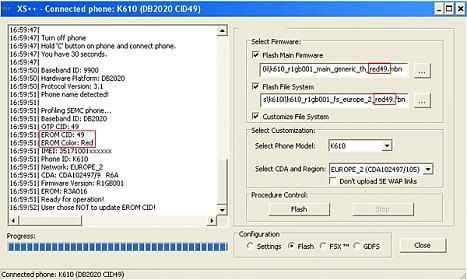
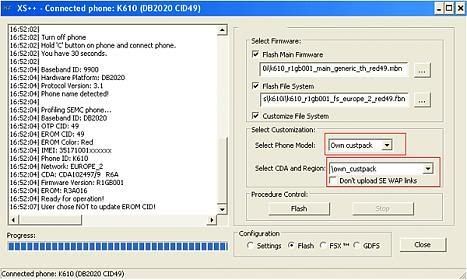
XS++ always shows you the EROM CID and the EROM Colour of your phone after connecting. You need to flash firmware matching that CID and Colour or your phone won’t work properly. If you’ve got a BROWN EROM you need to change it to a RED EROM before flashing red firmware to the phone.
Flashing the firmware to your phone
1. Connect your phone while holding down the “C” button.
2. After your XS++ successfully recognized your phone it will switch to the “Flash” tab automatically. Check “Flash Main Firmware”, “Flash File System” and “Customize File System”.
3. Choose your firmware and CDA, then press the “Flash” button.
Do this if the custpack you need is not implemented in XS++:
4. Download the custpack you need
5. Extract the files into the “own_custpack” folder in XS++
NOTE: Make sure that the first folder in own_custpack is “tpa”
6. Do steps 1. and 2.
7. Check “Customize file system”
8. Select “Own Custpack” in the “Select phone Model” dropdown menu
9. Press the “Flash” button
NOTE: Your phone will NOT work if you don’t customize the files system after flashing the FS। You will get an configuration error after trying to turn it on.
sofware download is here and cable dcu 60 driver
xs++ 3.1
http://www.4shared.com/file/32041400...XS_online.html
USB Flash Driver For DCU-60 Cable
http://www.4shared.com/file/27136649.../gg-setup.ह्त्म्ल
DOWNLOAD HERE XS++ 32